 Sidepaw
A desktop pet for your Mac
Your best friend, on your desktop.
We turn your dog or cat into a 3D cartoon that lives on your Mac. They keep you company while you work: wandering off for a sniff, napping when it’s quiet, playing fetch when you double-click, and doing happy hops when you pet them.
Free to try: the app comes with Bandit, our dog. Your own pet is $99 (launch price through December 31, then $129), made from your photos and ready the same day. For Macs with macOS 13 or newer.
Dogs and cats
Meet the pets we’ve made.
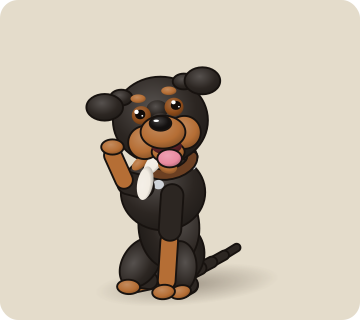
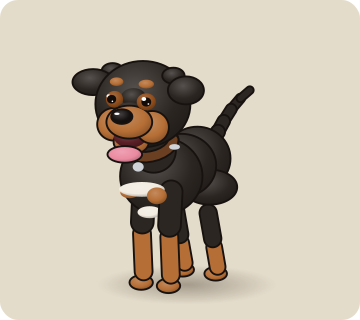
Waves when you sit down, chases his orange Chuckit ball when you double-click, and naps through your meetings.
See Bandit’s 10 moods →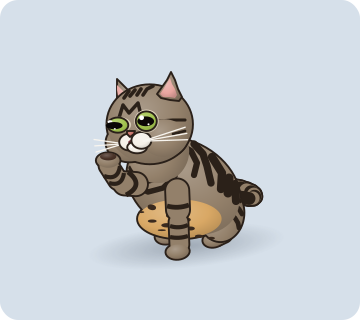
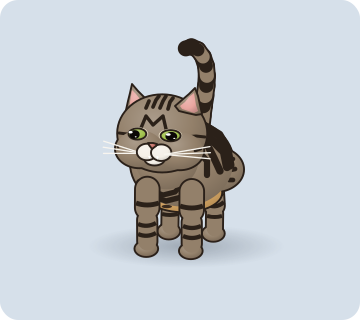
Loafs with slow blinks, prowls around your desktop, and naps belly-up when things go quiet.
See Mango’s 10 moods →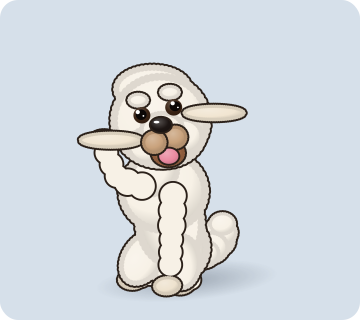
Tilts his fluffy head when your pointer comes near, trots laps, and brings back his plush toy.
See Apollo’s 10 moods →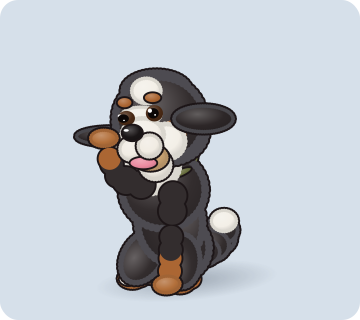
Nose and beard to the floor for a good sniff, and his famous sploot when it’s quiet.
See Luca’s 10 moods →How it works
Three steps, about five minutes of your time.
Try it free
Download Sidepaw Desktop and Bandit moves onto your desktop right away. Pet him, play fetch, watch him nap. No account, no card.
Send us your pet’s photos
Order, then upload six to ten phone photos (front, side, lying down, their favourite toy). Photos in by 3 pm Eastern means your pet arrives by 10 pm that night. One round of changes is included.
Add your pet
We email you your pet as a small file. Click the paw in your menu bar, choose Add a pet…, and they move in. We help if anything gets stuck.
Ten moods
Playful, curious, and very good at naps.
Use Claude Code? Switch on Follow along with Claude Code in the paw menu and the same moods follow your AI: sniffing while it searches, trotting while it works, happy hops when it’s done.
What you get
Your pet, made just once, and yours to keep.
- Your pet in 3D on your desktopAll 10 moods, always on top of your windows. Drag them anywhere; clicks pass straight through everywhere except your pet.
- Things to do togetherStroke them with your pointer for happy hops, click to say hi, double-click for fetch. They watch your pointer and wander off on their own.
- Their real toyFetch is played with the toy from your photos: the tennis ball, the felt mouse, the squeaky plush.
- Same-day delivery and one round of changesSomething not quite right? Tell us within 14 days and we fix it.
- Bonus for codersUse Claude Code? Your pet can follow along with your AI: sniffing while it searches, trotting while it works, happy hops when it’s done. The Claude Code panel add-on is included too.
Where it runs
Any Mac with macOS 13 Ventura or newer, Apple silicon or Intel. Try the free download first: if Bandit runs well on your Mac, your pet will too.
It’s light (under 1 MB), never connects to the internet, and doesn’t read your files.
Windows isn’t ready yet. Tell us in the order form if you’d like it.
Pricing
Free to try. One price for your own pet.
Try it
Sidepaw Desktop with Bandit
- Bandit on your desktop, all 10 moods
- Petting, fetch, wandering and naps
- No account, no card, no time limit
- Mac, macOS 13 or newer
Your pet
Launch price through December 31
- Your dog or cat in 3D on your desktop
- All 10 moods, made from your photos
- Their real toy for fetch
- Works with Claude Code too, if you use it
- One round of changes, ready the same day
Team mascot
The office dog, for everyone
- Everything in "Your pet"
- One pet the whole team installs
- Setup help for the team
- Invoice on request
Try it free
Meet Bandit on your own desktop.
- Download Sidepaw Desktop (under 1 MB). Open the zip from your Downloads folder and drag Sidepaw Desktop into Applications.
- Open it. The first time, macOS says it can’t check the app, because Sidepaw is new and not in the App Store yet. Click Done, open System Settings › Privacy & Security, scroll down and click Open Anyway. You only do this once.
- Say hi. Bandit appears at the bottom of your screen, and a paw appears in your menu bar for everything else: hide him, change his size, or add your own pet.
Sidepaw Desktop
Free · with Bandit · version 1.0
Mac, macOS 13 or newer, Apple silicon or Intel
A gift for any pet lover with a Mac.
You order and pay; you or they send the photos. It's ready the same day, so it even works as a last-minute gift. We also make gentle memorial pieces for pets who have passed.
Questions
Good questions.
Is it really free?
Yes. Sidepaw Desktop and Bandit are free, with no account, card or time limit. You only pay to have your own pet made: $99 at the launch price.
What do I need?
A Mac with macOS 13 Ventura or newer, Apple silicon or Intel. Nothing else: no account, no subscription.
macOS says it can’t check the app. Is it safe?
Yes. Sidepaw is new and isn’t in the Mac App Store yet, so macOS asks you to confirm the first time. Open System Settings › Privacy & Security, scroll down and click Open Anyway. You only do this once.
Will it get in my way or slow my Mac down?
No. Your pet floats above your windows, but clicks go straight through everywhere except the pet itself. Drag them anywhere, make them smaller, or hide them from the paw in the menu bar. It’s light: it draws at most 30 frames a second, and fewer while napping.
Does it use the internet or read my files?
No. Sidepaw Desktop never connects to the internet and only reads its own folder. No sign-up, no tracking.
How does my pet get into the app?
We email you your pet as a small file. Click the paw in your menu bar, choose Add a pet…, and pick the file. That’s it.
Do cats work?
Yes, dogs and cats. For other pets, ask us first.
Does it work on Windows?
Not yet. Tell us in the order form if you’d like it, and we’ll let you know.
I use Claude Code. Can my pet follow along?
Yes. Choose Copy Claude Code setup commands in the paw menu and run them, and keep Follow along with Claude Code ticked. Your pet sniffs while Claude searches, trots while it works and does happy hops when it’s done. It only looks at which tool Claude is using, never your code. We include the panel add-on for the Claude desktop app too.
How fast is it?
The same day. Send your photos by 3 pm Eastern and your pet arrives by email by 10 pm Eastern that night. Photos sent later arrive by 10 pm the next day. If we ever can't make it, we'll email you before the deadline, and you can cancel for a full refund.
What if I don't love it?
One round of changes is included: tell us within 14 days of delivery (extra rounds are $25). We refund in full if we haven't started building yet.
What happens to my photos?
We use them only to make your pet. We only show your pet in our gallery if you say we can.
Can my whole team use one pet?
Yes, that's the Team mascot: one pet for everyone on the team, for $249. See how it works for teams.
Order
Bring your best friend to your desktop.
Pay, then tell us about your pet and upload their photos. It takes about five minutes.
Already paid? Go straight to step 2.
Not sure yet? Try it free with Bandit first.
By ordering you agree to our terms.